Let me ask you something.
When you use a “free” background remover online, where does your photo actually go?
Most people never think about this. They search “free background remover” on Google, click the first link, upload their photo, remove the background, and download the result. Simple, right?
But here’s what they don’t see.
Their photo leaves their device. It travels to a remote server. It gets stored somewhere—maybe temporarily, maybe permanently. And they have no idea who can access it, where it’s kept, or whether it’s ever deleted.
I wanted to know how bad this problem really was. So I tested many free background removers. I used the browser’s Developer Tools to watch the network traffic. I checked which tools uploaded my photos and which ones kept them on my device.
The result? Eleven tools uploaded my images. Only one didn’t.
Here’s everything I learned, how I tested it, and which tool I trust now.
Why This Matters More Than You Think
Before we get into the test, let’s talk about why this is a real issue.
When you upload a photo to a remote server, a few things can happen:
- The server stores your image. Maybe it’s deleted after processing. Maybe it’s not.
- The tool’s team can access it. Most privacy policies technically allow this for “service improvement.”
- Your photo could be used to train AI models. Some tools openly admit this. Others bury it in the terms.
- If there’s a data breach, your images could leak. It happens more often than companies admit.
Now, for a random selfie, maybe none of this matters to you. But think about:
- Unreleased product photos: Your competitor would love to see those.
- Client images: Freelancers handle confidential photos daily. Uploading them to random servers can violate NDAs.
- Personal documents: Passport scans, ID photos, family portraits. You don’t want these on someone else’s hard drive.
- Professional headshots: The photographer owns the rights. Uploading to a free tool might violate the license.
The bottom line: your photos are your data. And you should know where they go.
How I Tested 12 Background Removers
The test was simple. You can do it yourself in under a minute:
- Open any background remover website
- Press F12 to open Developer Tools
- Click the Network tab
- Upload a small test photo
- Watch if any data gets sent to a server
If you see outgoing network requests with image data, your photo is being uploaded. If you see nothing leaving your device, the processing is happening locally.
I ran this test on 12 popular tools. Here’s what I found.
The Results: Almost Every Tool Uploaded My Images
I tested several popular free background removers. Not gonna name them all here—that’s not the point of this article. The point is what I discovered.
Almost every single one of them uploaded my photo to a remote server.
Some did it openly—their privacy policy mentions storing images for “service improvement.” Others buried it deep in the terms where nobody reads. A few didn’t mention it at all, but my Network tab told the real story.
In the end, the result was the same across the board: your image leaves your device. You lose control of where it goes.
Except for one.
The Only Tool That Passed: iBGremove
Full disclosure before I continue: I built iBGremove.com.
I’m a Nepali 🇳🇵 working in Saudi Arabia 🇸🇦. I work a 12-hour day job. At night, I build free tools. After getting frustrated with existing options—either they charged money, limited my usage, or uploaded my private photos—I decided to build my own background remover.
Here’s what makes iBGremove different from everything else I tested.
1. 100% Browser-Based Processing
Your photo never leaves your device.
The AI runs entirely in your browser. After the page loads, you can disconnect your internet and the tool still works. I designed it this way on purpose. Privacy isn’t a bonus feature—it’s the foundation.
2. No Signup Required (Ever)
No email field. No “create your free account.” No “sign up to download.”
You visit the site. You remove your background. You download your image. You leave. That’s the entire experience.
I don’t want your email. I just want you to get your work done.
3. Unlimited Free Use
No credits. No “5 free per day.” No “upgrade to Pro for HD.”
Process as many images as you need. Download in full high resolution. Every time. No catch.
4. Handles Complex Images
Because the processing happens locally at full resolution, iBGremove handles images that make other tools fail:
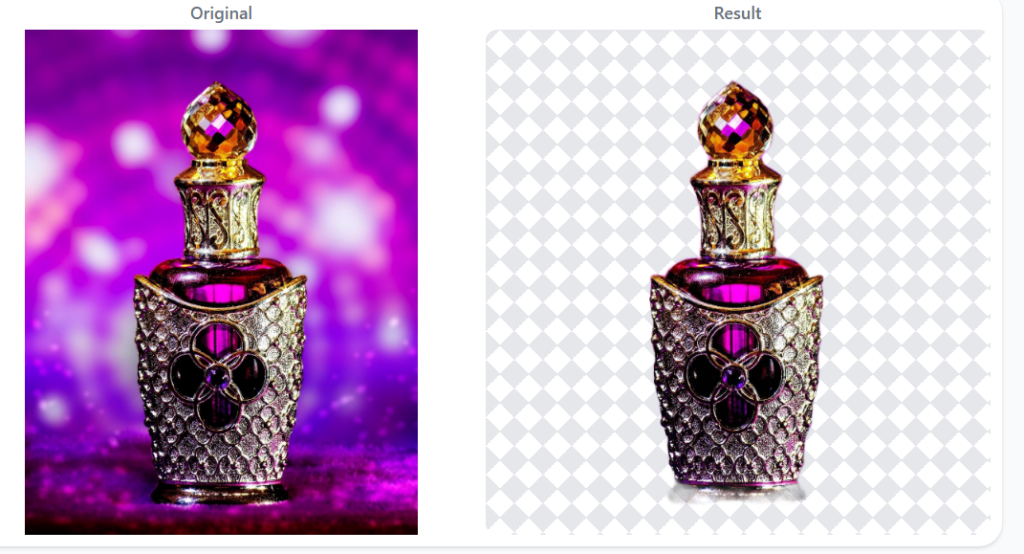
- Reflective glass (perfume bottles, windows)
- Hair and fur (fine details preserved)
- Smoke and fog (semi-transparent backgrounds)
- Mesh and netting (complex patterns)
- Busy real-life backgrounds (clutter, people, objects)
I’ve tested it on all of these. It performs consistently.
5. Multiple Background Options
After removing the background, you can choose:
- Transparent — For logos, graphic design, overlays
- White — For Amazon, Meesho, eBay, Flipkart listings
- Blue / Gray — For professional headshots
- Blurred — For soft, aesthetic social media posts
6. Pre-Set Sizes for Popular Platforms
Built-in crop sizes so you don’t need a separate resizing tool:
- Passport photo
- ID Card
- Instagram Post (1:1)
- Instagram Story (9:16)
- Pinterest Pin (2:3)
- YouTube Thumbnail (16:9)
7. Works on Mobile Browsers
No app download required. Open your phone’s browser, go to ibgremove.com, and start editing. Works on Android and iPhone equally well.
Quick Comparison Table
| Feature | iBGremove | Most Other Free Tools |
|---|---|---|
| Price | Free forever | Free with limits |
| Signup Required | Never | Often required |
| Photo Upload to Server | Never | Almost always |
| Processing Location | Your browser | Remote server |
| Unlimited Use | Yes | No (daily credits) |
| HD Download | Yes | Often paywalled |
| Works Offline | Yes | No |
| Pre-set Sizes | Yes | Rarely |
Who Is iBGremove For?
Since launching, I’ve seen the tool used by a wide range of people:
🛍️ E-commerce Sellers — Product photos for Amazon, Meesho, Daraz, Flipkart, eBay, Shopify. Clean white backgrounds that increase conversion rates.
🎨 Freelance Designers — Quick client edits for Fiverr, Upwork, and direct projects. Process 50 images in minutes without paying a cent.
📱 Social Media Creators — Instagram posts, YouTube thumbnails, Facebook ads. Professional visuals without expensive software.
📸 Photographers — Quick proofs before sending to clients. No need to open Lightroom for a simple background removal.
🏫 Students — Projects, presentations, assignments. Make your work look professional without spending money.
💼 Small Business Owners — WhatsApp Business catalogs, product listings, promotional materials.
👤 Anyone with a Photo — Passport photos, profile pictures, family portraits with messy backgrounds.
How to Use iBGremove (Takes 3 Seconds)
There’s no learning curve. Here’s the entire process:
- Go to ibgremove.com on any browser
- Upload your photo (drag-and-drop or click to browse)
- Wait about 3 seconds while the AI processes your image
- Choose your preferred background (white, transparent, blue, gray, blurred)
- Click download
Bonus Tip: Once you’ve removed the background and downloaded your clean image, you might need to resize and compress it without losing quality for your store listing or social media post. I built a free tool for that too.
That’s it. No step 6. No email capture. No surprise paywall.
Frequently Asked Questions
Q: Is iBGremove really free?
Yes. Completely free. No daily limits, no credit system, no hidden fees. I built it to be free forever for individual users.
Q: Do I need to create an account?
Never. You don’t need to sign up, enter an email, or provide any information whatsoever.
Q: Are my photos really private?
Yes. All processing happens inside your browser using local AI. Your images never leave your device. You can verify this by turning off your internet after loading the page—the tool still works.
Q: What image formats are supported?
PNG, JPG, and WEBP. Maximum file size is 10MB.
Q: Can I use it on my phone?
Absolutely. iBGremove works on any device with a browser—Android, iPhone, iPad, or desktop.
Q: Does it work offline?
Yes. Once the page loads, you can disconnect your internet. The AI runs locally and continues to work.
Q: How is this different from Remove.bg or Adobe Express?
Those tools process your images on their servers. iBGremove processes everything in your browser. Your photos stay with you.
Q: Can I get a transparent background?
Yes. You can download with transparent, white, blue, gray, or blurred backgrounds.
Q: Who built this?
I’m a Nepali developer working in Saudi Arabia. I build free tools after my 12-hour day job. No team. No funding. Just me and my laptop.
Q: Will it always be free?
Yes. I built iBGremove as a free tool, and it will remain free. If I ever add premium features in the future, the core background removal will stay free forever.
A Complete Free Toolkit for Sellers & Creators
iBGremove handles your background removal. But what about the rest of your workflow?
Here are a few more free tools I built that work perfectly together:
🖼️ Ultimate Image Resizer — Resize and compress your cleaned product photos for any platform without losing quality.
🎨 Instagram Fancy Fonts Generator — Create eye-catching fonts for your social media captions, bio, and stories.
📄 Multiple Images to PDF Converter — Got several product images? Combine them into one clean PDF for client presentations or catalogs.
All tools are free. No signup required. Built by one guy after work hours.
Conclusion
Most “free” background removers aren’t actually free. They cost you something more valuable than money: your privacy.
Your photos leave your device. They get stored on remote servers. You lose control of where they go and who sees them. For some people, that’s acceptable. For many—especially sellers, freelancers, and anyone handling sensitive images—it shouldn’t be.
I built iBGremove to fix this.
It’s free. It’s private. It’s unlimited. It takes 3 seconds. And your photos never leave your browser.
If you’ve been looking for a background remover that doesn’t require signup, doesn’t limit your usage, and doesn’t steal your data—this is it.
👉 Try it now: ibgremove.com