A simple guide for sellers, freelancers, and anyone tired of fighting with Photoshop.
Table of Contents
The Problem with Perfume Bottles
Whoever designs perfume bottles clearly never had to edit photos of them.
You’ve got curved glass throwing reflections everywhere. Transparent bits where the background shows through. Tiny details on the cap that get clipped off. And just when you think you’ve got a clean shot, the lighting makes half the bottle look like a ghost.
I sell online. Not perfumes specifically, but I’ve edited enough product photos to know the pain. You spend 20 minutes in Photoshop, carefully tracing edges, fixing transparency, undoing mistakes. Then you upload to Amazon or Meesho and realize… it still doesn’t look professional.
So I built something that handles this mess for me. It’s free. And it took me about 3 seconds last time I used it.
What I Use (And Why)
The tool is called iBGremove.com. I should mention—I built it myself. Not with a team, not with funding. Just me, late nights in Saudi after a 12-hour shift, and a frustration with existing tools.
Here’s what matters for product photos:
- Glass & Reflections: Most AI tools panic when they see reflections. They either erase half the bottle or leave a weird halo. iBGremove handles it fine because it processes the image locally—the AI model actually sees the full resolution and detail.
- Privacy: This is the bit nobody talks about. When you use those other free tools, your product photos go to their server. For a random meme, who cares. For an unreleased product shot? For a client’s proprietary design? That’s a hard no. iBGremove keeps everything on your device. Nothing leaves your browser.
- No Signup: I hate when I just want to edit one photo and the tool asks for my email, my name, my blood type. Skip all that. Just open the site and use it.
- It’s Free. Actually Free: Not “free trial.” Not “5 free credits.” You can use it as much as you want. I built it that way on purpose.
How I Remove a Perfume Bottle Background (Step by Step)
I recorded a video of this, but here’s the text version:
1. Go to ibgremove.com
Works on phone or laptop. No app to install. Your browser is fine.
2. Drop your photo
Click upload or just drag the image in. I used a perfume bottle shot against a messy desk background—coffee cup, papers, the works.
3. Wait a few seconds
The tool thinks for maybe 3 seconds. Everything happens inside your browser—your photo doesn’t travel anywhere. If you don’t believe me, turn off your WiFi after loading the page. Still works.
4. Pick a background
This is where it gets useful for selling:
- White background → Perfect for Amazon, Meesho, eBay listings
- Transparent → For graphic design or overlays
- Blue/Gray → Nice for social media posts
- Blurred → Soft look for Instagram
I usually go with white. Clean, professional, what buyers expect.
5. Download
You get a PNG. High resolution. No watermark. Ready to upload wherever you sell.
That’s it. Took me longer to write this section than to actually do it.
Watch It Happen (Video)
Here’s the full process. Perfume bottle in, clean product shot out. No smoke and mirrors.
Before and After
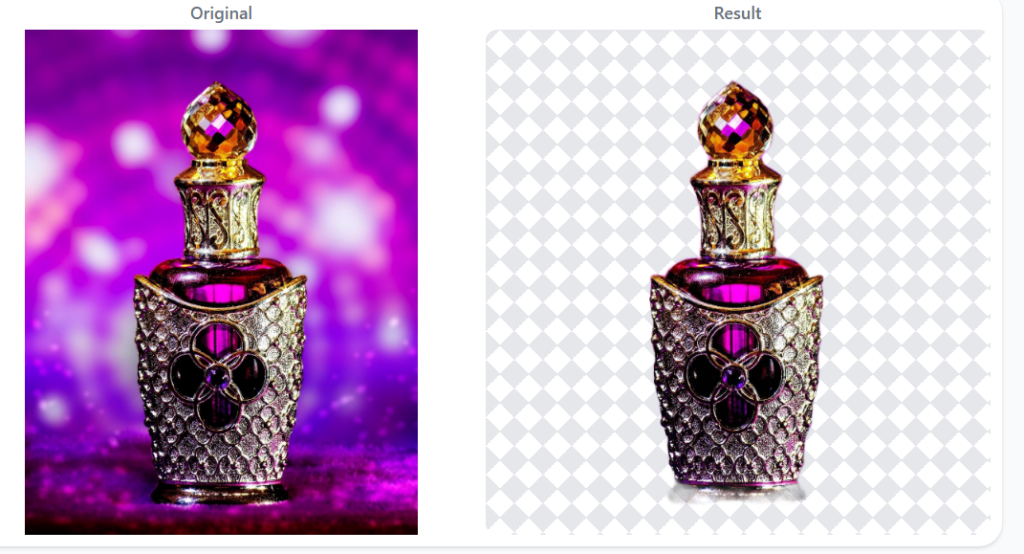
Left: Original shot. Messy desk. Coffee cup photobomb.
Right: Clean white background. Looks like a professional product shoot.
Same photo. Few seconds apart.
Some Things I’ve Learned About Product Photos
After doing this for a while (and making plenty of mistakes), a few tips:
- Natural light works better than flash. Flash creates harsh reflections on glass. If you’re shooting perfume bottles, put them near a window on a cloudy day. Soft light = clean edges.
- Plain backgrounds help, but aren’t necessary. The tool works fine with messy backgrounds. But if you can, shoot against a wall. Makes everyone’s life easier.
- Shoot slightly from above. Flat-on shots make the bottle look 2D. A slight angle gives depth.
- Be consistent. If you’re listing 10 perfumes on Amazon, use the same background color for all. Looks way more professional than a mix of white, gray, and “whatever the camera picked up.”
- Don’t overthink it. Some sellers spend hours perfecting one photo. Most buyers are looking on their phone while half-distracted. Clean background, clear product, good to go.
Who Actually Needs This?
I built this for myself, but turns out a lot of people have the same problem:
- E-commerce sellers — Amazon, Meesho, Flipkart, Daraz, Shopify. Product photos with clean backgrounds convert better. I’ve seen numbers around 40% improvement, though that depends on what you’re selling.
- Freelancers — Fiverr, Upwork. If a client sends you 20 product photos and needs them “web-ready by tonight,” you don’t want to spend 20 minutes per image.
- Small perfume brands & resellers — Launching new products constantly. Professional photos for every new scent would cost a fortune. This is free.
- Anyone with a phone and something to sell — Honestly, if you’ve got a camera and a product, you’re set.
A Quick Note on Privacy (Because Nobody Reads Terms of Service)
Most “free” online tools make money by collecting data. Your photos go to their server. They process them. Then… who knows.
I built iBGremove differently because I got burned by this myself. The tool runs entirely in your browser. After you load the page, you can disconnect the internet and it still works. Your files stay with you.
If you’re selling products that haven’t launched yet, or handling client work, this matters.
The End (Start Removing Backgrounds)
I’m not going to write some big closing paragraph. The tool is free. It works. Try it or don’t.
If it helps, cool. If something breaks, tell me and I’ll fix it.