You’ve put your heart into building your amazing Facebook Page, and now you’re ready to get it out into the world. But let’s be honest, typing out a long, complicated web address? It’s a hassle for you to share and for people to type. What if you could shrink your entire page into a single, magical square that anyone can scan with their phone? An instant gateway, right to your door.
This isn’t some fancy, expensive tech trick. I’m going to walk you through the incredibly simple steps to create your very own QR code—completely free and in just a few minutes. Ready to make sharing your page as easy as a click and a scan? Let’s unlock that power together.
Table of Contents
What Is a Facebook QR Code and How Does It Work?
Let’s break this down in the simplest way possible. Think of a Facebook QR code as a clever shortcut. It’s that little black-and-white square pattern you’ve been seeing everywhere. But instead of being a random design, this one is a unique map that leads directly to your Facebook Page.
So, how does this magic work? It’s beautifully straightforward. When someone pulls out their phone’s camera and points it at your QR code, the camera instantly recognizes the pattern. It reads the “map” embedded within it and, without any fuss, automatically opens your Facebook Page right on their screen. No typing, no searching, no chance for typos. It’s a one-tap journey from seeing your code to being on your page.
You’ve probably seen these in action without even realizing it! They’re on restaurant flyers, at the bottom of a business card, or on a small stand at a local shop’s counter. It’s the modern, super-efficient way to say, “Here I am, come and check out my world.” It turns everyday objects into direct gateways to your online community.
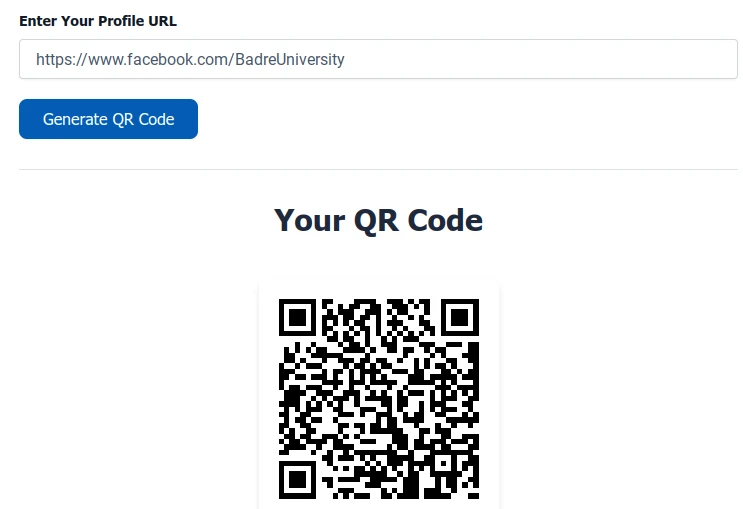
For official information about Facebook’s features and how they can benefit your business, you can refer to the comprehensive guides available in the Facebook Help Center.
Benefits of Creating a QR Code for Your Facebook Page
Now that you know what a Facebook QR code is, let’s talk about the real magic—why you absolutely need one for your page. Think of it as more than just a pixelated square; it’s your ultimate wingman for growing your audience.
The perks are honestly too good to ignore. Imagine connecting with people in a flash. Instead of fumbling with usernames, a simple scan instantly brings them to your page, making building your community faster than ever. It’s also your secret weapon for offline marketing. That flyer, receipt, or poster on a bulletin board? With a QR code on it, it becomes a powerful bridge, guiding people directly from the physical world to your online doorstep. And let’s be honest, it just looks professional. It shows you’re modern, tech-savvy, and you value your audience’s time.
Whether you’re a local bakery wanting to showcase daily specials, an artist sharing your portfolio, or an influencer growing your follower base, this little code is your universal key. The best part? You don’t need to be a tech wizard. Creating your own is surprisingly simple, free, and takes just a few minutes. Let’s move into how you can unlock these benefits for yourself.
Step-by-Step Guide: How to Create a Free QR Code for Your Facebook Page
Alright, let’s roll up our sleeves and create your very own QR code! This is the fun part where we turn your Facebook Page link into something magical. Trust me, if you can copy and paste, you’ve already mastered the hardest part of this process. Let’s walk through this together—no technical degree required!
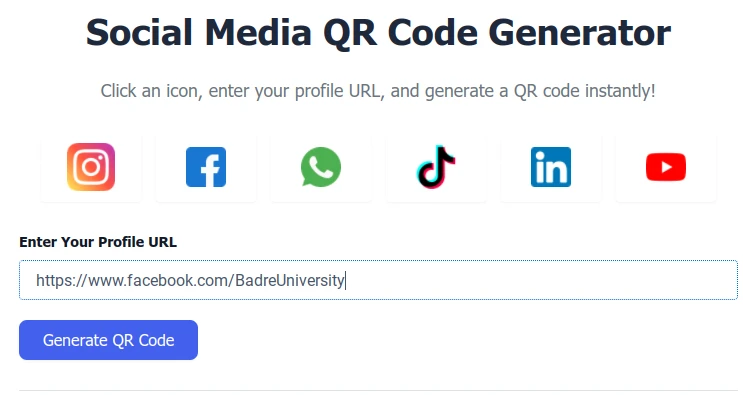
Here’s how simple it is:
First, head over to your Facebook Page and copy the web address from the top of your browser. You know, just like when you share a link with a friend. Now, here’s where the magic happens. I actually have a free tool right here on my site that makes this super easy—my own Social Media QR Code Generator. Why send you searching elsewhere when I can help you directly?
Just pop that link you copied into the box below. Then, give that “Generate QR Code” button a click. Watch how that boring long URL transforms into a neat, scannable square right before your eyes. That’s your unique code, ready to work for you!
The final step? Download your new QR code to your phone or computer and—this is important—test it! Open your camera, point it at the code, and make sure it zips you right over to your Facebook Page. There’s nothing quite like that feeling when you see it work perfectly.
Ready to make yours? Let’s do this!
Best Places to Use Your Facebook QR Code
So, you’ve got your shiny new QR code ready to go—that’s fantastic! But now you might be wondering, “Where do I actually put this thing?” Well, that’s where the real fun begins. Think of your code as a friendly digital guide, and your job is to place it wherever you want to lead people back to your Facebook community.
Let’s start with the physical world. Slap it on your product packaging or a poster in your local cafe. Tuck it into the corner of your shop window or on your restaurant’s menu. Don’t forget your business card—that little square can turn a simple card into a direct portal to your work. Every time you do this, you’re building a bridge. You’re taking someone from standing in front of a poster and instantly placing them into your online world, boosting your traffic and followers without them ever typing a word.
But why stop there? Get creative! Print it on event tickets or flyers for your next workshop. Pop it into your email signature so every message you send is an invitation. You can even add it to the bottom of a digital ad or a promotional video. The goal is simple: make it effortless for people to find and follow you, no matter where they are.
Common Mistakes to Avoid When Creating a Facebook QR Code
You’re almost there! Creating your QR code is simple, but there are a few small bumps in the road that can trip people up. Knowing about them ahead of time will make sure your code works perfectly every single time, saving you from any awkward “oops” moments. Let’s walk through these common slip-ups so you can confidently avoid them.
The biggest heartbreaker is a broken link. Imagine someone excitedly scans your code only to get an error message! This usually happens if you change your Facebook Page’s web address after creating the code, or if you accidentally copied the wrong link. Another frequent issue is a poor-quality print. If you print your code too small or it gets blurry, your phone’s camera just can’t read it—it’s like trying to read smudged writing. And while getting creative is fun, sometimes a busy design with too many colors or a weird shape can make the code completely unreadable to a scanner.
It’s also important to be aware of security concerns. The Federal Trade Commission (FTC) has issued official warnings about QR code scams, advising businesses and users to always verify codes before sharing them publicly to prevent security risks.
The good news is that all of these have super simple fixes. Always double-check that you’ve copied the correct, full URL for your page. When printing, make sure the image is clear and a decent size. Most importantly, always test your code! Scan it with a few different phones before you share it with the world. To make your life easier, using a reliable and free tool like our trusted Social Media QR Code Generator takes the guesswork out. It gives you a clean, high-quality image right from the start, setting you up for success. A little care now means a seamless experience for your new followers later.
FAQs
1. What is a Facebook QR Code?
Think of it as a direct shortcut. Instead of asking someone to type out a long web address, this little black and white square does all the work. They just scan it with their phone’s camera, and it instantly takes them straight to your Facebook Page. It’s the fastest way to help people find your community or business.
2. Can I create a Facebook QR code for free?
Absolutely, and you should never have to pay for something this simple! You can create one right now without spending a single rupee. Just use the Social Media Free QR Code Generator on this website. Paste your Facebook link, and your personal code is ready in a flash.
3. Do I need any technical skills to create a QR code?
Not one bit! If you can copy a link from your browser and paste it into a box, you have all the technical skill you need. It’s designed to be so easy that anyone can do it on their first try.
4. Can I customize the color or style of my Facebook QR code?
You sure can! Many free QR code generators allow you to customize your design. You don’t have to stick with boring black and white. You can change the color to match your brand, play with the shape of the dots, and really make it your own. It’s a great way to make your code look professional and stand out.
5. Where should I use my Facebook QR code?
Anywhere you want to make a connection! Slip it onto your business cards or flyers. Stick it on your shop window or product packaging. You can even add it to your emails or social media posts. The idea is to make it available wherever people might want to find you online.
6. Will my Facebook QR code expire?
No, it won’t. Once you create it, that code is yours for good. It will keep working forever, unless you decide to delete the Facebook Page it’s linked to. You don’t have to worry about it magically stopping one day.
7. How can I test if my Facebook QR code works properly?
This is the most important step! Before you print a thousand copies, just do a quick test. Pull out your own phone, open the camera, and point it at the code on your screen. If it takes you right to your page, you’re all set. It’s always better to be safe than sorry!
8. Can I track how many people scan my Facebook QR code?
Yes, some tools can help you with that. If you use a QR code generator that includes analytics, it can show you handy details like how many people scanned your code and even where they were. It’s a fantastic way to see what’s working.
9. Is it safe to use online QR code generators?
That’s a great question, and it’s smart to be cautious. The safety really depends on the tool you choose. I always recommend sticking with well-known, reliable generators. That’s why I created the Free Social Media QR Code Generator to be a secure, reliable tool that gets the job done without storing your personal data. You can use it with complete peace of mind. complete peace of mind.
Conclusion
And there you have it! You’re now fully equipped to create and use your very own Facebook QR code. It’s incredible how such a simple tool can open so many doors, turning everyday moments into new connections for your page.
Remember, this isn’t about complex technology; it’s about making it effortless for people to find and enjoy what you’ve created. So, take that code you’ve made, place it proudly in the world, and watch as your community grows—one simple scan at a time.
You’ve got this! Now, go and share your amazing work with the world.

